Build your family story one generation at a time with an easy-to-use family tree maker designed for beginners, families, students, and genealogy researchers.
Add parents, grandparents, children, spouses, siblings, photos, important dates, and family stories. Organize everything into a clear family tree that you can edit, save, print, download, or share with relatives.
You should not need professional genealogy software just to organize your family history.
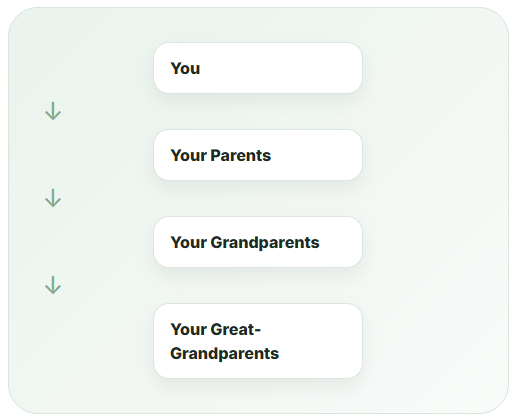
Our online family tree maker gives you a simple way to start with yourself and gradually connect parents, grandparents, children, siblings, partners, and extended family members.
You can begin with a small three-generation tree and expand it whenever you discover more information.
Every person can have their own profile where you can record useful details such as names, birth dates, places, relationships, photographs, notes, and family stories.
Whether you want to create a family tree for personal research, a school assignment, a family reunion, or long-term genealogy work, the goal is the same: make your family history easier to understand and preserve.
You do not need to know everything before creating your tree.
Start with the information you already know. Add missing dates, photos, locations, and relatives when you find them.
Tip: Begin by speaking with parents, grandparents, aunts, uncles, and older relatives. Family conversations can reveal names, nicknames, marriages, migration stories, and dates that may not appear in documents.
Start by entering your name and any basic information you want to include.
You can then connect your parents, children, spouse, partner, siblings, or other family members.
Select a person in your tree and choose the relationship you want to add.
For example:
The family tree maker automatically organizes the connections so you do not have to manually draw every line.
A family tree becomes more valuable when it contains more than names.
You can record information such as:
Only add information you are comfortable saving or sharing.
Choose how you want the family tree to appear.
Depending on the tree you are creating, you may prefer an ancestor chart, descendant chart, pedigree layout, fan chart, or traditional family tree.
When your tree is ready, save it for later or create a version you can share with family members.
Available export options can include:
A useful family tree tool should do more than place names inside boxes.
Our goal is to give you the features needed to document real families while keeping the experience easy enough for beginners.
| Feature | What It Helps You Do |
|---|---|
| Easy family tree editor | Add and connect relatives without manually drawing the tree |
| Automatic layout | Keep generations organized as the tree becomes larger |
| Individual profiles | Store information about each family member |
| Photos | Add faces and family memories to the tree |
| Dates and locations | Record important life events |
| GEDCOM import | Bring an existing genealogy tree into the website |
| GEDCOM export | Keep a portable copy of your genealogy information |
| Printable family trees | Create a physical copy for your home or relatives |
| PDF and image export | Save your family tree in common formats |
| Private trees | Keep personal family information away from public search results |
| Family tree templates | Create different styles for different purposes |
| Relationship tools | Understand connections between relatives |
| Family timeline | Organize important family events by date |
Already have a family tree somewhere else?
You may not need to enter every person again.
GEDCOM is a commonly used genealogy file format that allows family tree information to move between compatible genealogy programs and websites.
With GEDCOM support, you can import an existing file and continue organizing your family history using our online family tree maker.
A GEDCOM file may contain information including:
GEDCOM stands for Genealogical Data Communication.
It is designed to transfer family-tree data between different genealogy applications.
For example, if you created a tree using another genealogy program, you may be able to export it as a .ged file and import the information into another compatible service.
Tip: Always keep a backup of your original GEDCOM file before importing or editing a large family tree.
Not every family tree needs the same design.
A child completing a school project may need a simple three-generation chart, while a genealogy researcher may want a detailed ancestor tree covering six or more generations.
Explore family tree templates including:
Ideal for children, school projects, and simple family history displays.
Usually includes:
Useful when you have already started researching historical records and older generations.
Families do not always fit into a simple mother-father-child diagram.
A modern family tree maker should allow you to document relationships accurately and respectfully.
Depending on your family structure, your tree may include:
If a relationship is complicated, focus on recording what you know rather than forcing every person into a traditional layout.
Suppose Michael has one child from a previous marriage and two children with his current spouse.
A properly structured family tree should show both relationships separately instead of incorrectly placing all children under one marriage.
These details matter when a tree is used for serious family-history research.
Family history can contain sensitive personal information.
That is why privacy should be considered from the moment you start building your tree.
Your family tree should be private by default, especially when it contains information about living relatives.
Before sharing information publicly, consider whether it includes:
A family tree can use different visibility levels:
Private
Only you can view the tree.
Family Access
Only invited relatives can view or contribute.
Shared Link
People with a private link can access the tree.
Public
Information you intentionally choose to publish can be visible publicly.
Privacy Tip: Avoid publishing detailed personal information about living people without their permission.
Genealogy is about more than collecting names.
A family tree becomes much more meaningful when it explains what happened during a person’s life.
For example, instead of recording only:
Robert Wilson
1924–2001
you could create a simple timeline:
1924 — Born in Ohio
1943 — Joined the U.S. Army
1947 — Married Elizabeth
1951 — Moved to California
1952 — First child born
1988 — Retired
2001 — Died at age 77
You can then add photographs, stories, documents, occupations, places, and memories.
This turns your family tree maker into a record of family history rather than just a diagram.
Family relationships can become confusing after several generations.
You may know that two people are cousins, but determining whether they are second cousins, third cousins, or cousins once removed can be difficult.
A relationship calculator can help explain those connections.
If two people share the same grandparents, they are generally first cousins.
If they share the same great-grandparents, they are generally second cousins.
When people belong to different generations, terms such as once removed may apply.
Use the relationship tools alongside your tree to better understand how family members are connected.
A digital tree is useful for research, but many families also want something they can print.
Printable family trees are useful for:
Before printing a very large family tree, check:
Large trees may print better across multiple pages or on poster-size paper.
Different family trees answer different questions.
| Tree Type | Best For |
|---|---|
| Ancestor Tree | Finding where you came from |
| Descendant Tree | Showing descendants of one ancestor |
| Pedigree Chart | Direct-line genealogy research |
| Fan Chart | Displaying many ancestors compactly |
| Photo Family Tree | Family keepsakes and gifts |
| Extended Family Tree | Showing cousins, aunts, uncles, and multiple branches |
| Family Tree for Kids | School assignments and simple learning |
| Blended Family Tree | Representing step and multiple-parent relationships |
You can draw a family tree on paper or create one manually in a spreadsheet, but these approaches become difficult to manage as the family grows.
An online family tree maker can organize relationships automatically.
The right method depends on how much information you want to preserve.
A beautiful tree is useful, but an accurate tree is much more valuable.
Whenever possible, note where information came from.
Examples include:
Two people with the same name may not be the same person.
Check locations, ages, spouses, parents, and occupations before connecting records.
Export your tree periodically, especially if you have spent months or years researching it.
Our family tree maker is designed for many types of users.
Create a large chart to help relatives understand how different branches of the family connect.
You can start creating a family tree using the free features available on the website. If optional premium storage, collaboration, or additional design features are introduced, those features should be clearly identified before you use them.
No. The online family tree maker works through a compatible web browser, so you do not need to install traditional desktop genealogy software.
You should be able to start a basic tree with minimal friction. An account may be useful when you want permanent cloud saving, multiple trees, private collaboration, or access from different devices.
If you already have a GEDCOM file, use the GEDCOM import option to bring supported family data into your tree rather than entering every relative again.
GEDCOM is a genealogy file format used for transferring family-tree data between compatible genealogy applications and websites.
Yes. Printable formats such as PDF are designed to make it easier to create a physical copy of your family tree.
Photos can make your tree easier to recognize and much more personal. Add profile photographs, historical images, or other family pictures where available.
A useful family tree should support biological, adoptive, step, and other family relationships so your tree can represent your actual family.
You can start with only two or three generations and continue expanding the family tree as you discover earlier ancestors or additional descendants.
Private family-tree information should not be publicly indexed. Always check the visibility setting before intentionally publishing any family information.
Begin with information you know with reasonable confidence:
Then use family documents and historical records to expand the tree.
Start with known relatives and work backward. Talk with family members, review family documents, and then search appropriate birth, marriage, death, census, cemetery, military, immigration, and newspaper records.
Every family has a history worth preserving.
You do not need to complete everything at once. Start with one person, add the relatives you know, and expand your tree as new information becomes available.
Use our family tree maker to organize generations, preserve important details, add photographs and family stories, and create a family tree you can continue building for years.